Every few months someone sends me the same link with the same question: "Is it true this runs a 70B model on a 4GB machine?" The link is AirLLM, an open-source Python library that claims to run very large language models on a GPU with as little as 4GB of memory. The question usually comes from a founder trying to decide whether they can stop paying for an LLM API and run a model on their own hardware.
So I tested it properly. One base Mac mini, one external SSD, three model sizes, and a stopwatch on every token.
The short answer: the claim is true, and it is misleading. AirLLM really does run models far bigger than your memory. On my machine, Llama 3.1 8B answered correctly at 19.6 seconds per word, and a 70B model would take two and a half to three minutes per word. Here is how it works, what it took to get running, and when it is actually worth using.

How AirLLM runs a big model on a small machine
AirLLM never holds the whole model in memory; it streams the model from disk one layer at a time, for every single token it generates. That is the entire trick, and it explains both why the claim is true and why it is slow.
A language model is a stack of layers. Llama 3.1 8B has 32 of them; the 70B version has 80. Normally the whole stack sits in memory and each token flows through it in milliseconds. AirLLM splits the model into one file per layer on disk. To produce a token, it loads the first layer, runs it, frees it, loads the next one, and so on to the end. Then it does the whole thing again for the next token.
Peak memory is one layer plus a small cache, so a 70B model really can run in a few gigabytes. The cost is that the full model is read from disk once per token. That gives you the only formula you need to predict AirLLM's speed:
Seconds per token is roughly the model's size divided by your disk's read speed.
A 141GB model on a 1GB/s drive is about 141 seconds per token before anything else happens. The GPU work is quick; the waiting is all disk.
My test setup
I ran everything on a base Apple M4 Mac mini with 16GB of unified memory, with the models stored on a 2TB Crucial X9 external SSD over USB, rated at about 1GB/s. The internal disk had only about 35GB free, which is too little for anything large, and that turned out to be a constraint worth writing about on its own.
The details, so you can reproduce it:
- Software: AirLLM 2.11.0, Apple's MLX 0.29.3 (AirLLM uses MLX to run layers on the Mac's GPU), Transformers 4.46.3, PyTorch 2.8.0, and the Python 3.9 that ships with macOS.
- Precision: full fp16 layers. AirLLM's 4-bit and 8-bit compression options depend on a library that needs an NVIDIA GPU, so they are not available on a Mac.
- Models: TinyLlama 1.1B Chat as a smoke test, Llama 3.1 8B Instruct, and Llama 3.1 70B Instruct for the projection.
- The test: "What is the capital of France? Answer in one sentence." with 20 new tokens and greedy decoding, timed end to end.
- Disk budget: AirLLM keeps both the downloaded model and its split copy, so every model needs about twice its size in free space. The 8B model used 15GB plus 15GB; the 70B needs roughly 141GB plus 141GB.
Getting it running on Apple Silicon took four fixes
AirLLM works on a Mac, but not out of the box: I hit two crashes, one silent bug that would have garbled the output, and one cosmetic problem. The project's last release was in 2024, and its Mac code path shows it. I fixed all four in a small wrapper script rather than editing the library, so updates would not undo them.
- It only accepts models split into several shards. AirLLM looks for a model.safetensors.index.json file. Models shipped as a single file, like TinyLlama, crash with an assertion error. The fix was to download the model myself and generate that index file when it is missing.
- The layer folder has to exist before AirLLM checks your free space. Point it at a new folder on an external drive and it crashes with "No such file or directory". Creating the folder first fixes it.
- The Mac path hard-codes a setting that Llama 3 changed. AirLLM's Apple Silicon code sets the position-encoding base (rope_theta) to 10,000, which was right for older Llama models. Llama 3.x uses 500,000. Nothing crashes; the model just produces confident nonsense. I patched it to read the value from the model's own config, and the 8B output came back correct.
- Generation does not stop when the answer ends. It keeps going until it hits the token limit, so you get the answer followed by junk. Trimming at the end-of-answer marker fixes the display.
One gap remains: Llama 3.1's long-context scaling is not implemented on the Mac path. Short prompts are fine; very long ones may degrade. If you are evaluating open-source AI tooling for a product, this is the pattern to expect from research-grade libraries: the headline works, the edges are yours to maintain.
The results: 1 second per word, then 19.6
Both models answered "The capital of France is Paris." TinyLlama took 1.0 second per token; Llama 3.1 8B took 19.6 seconds per token, close to what the SSD's speed predicts.
TinyLlama 1.1B: about 1 second per token. Twenty tokens took 0.3 minutes. All 22 layers ran in under a second per pass. The model is about 2GB, so after the first pass macOS kept it in its memory cache and the SSD was barely touched. Small models get a free speed boost this way.
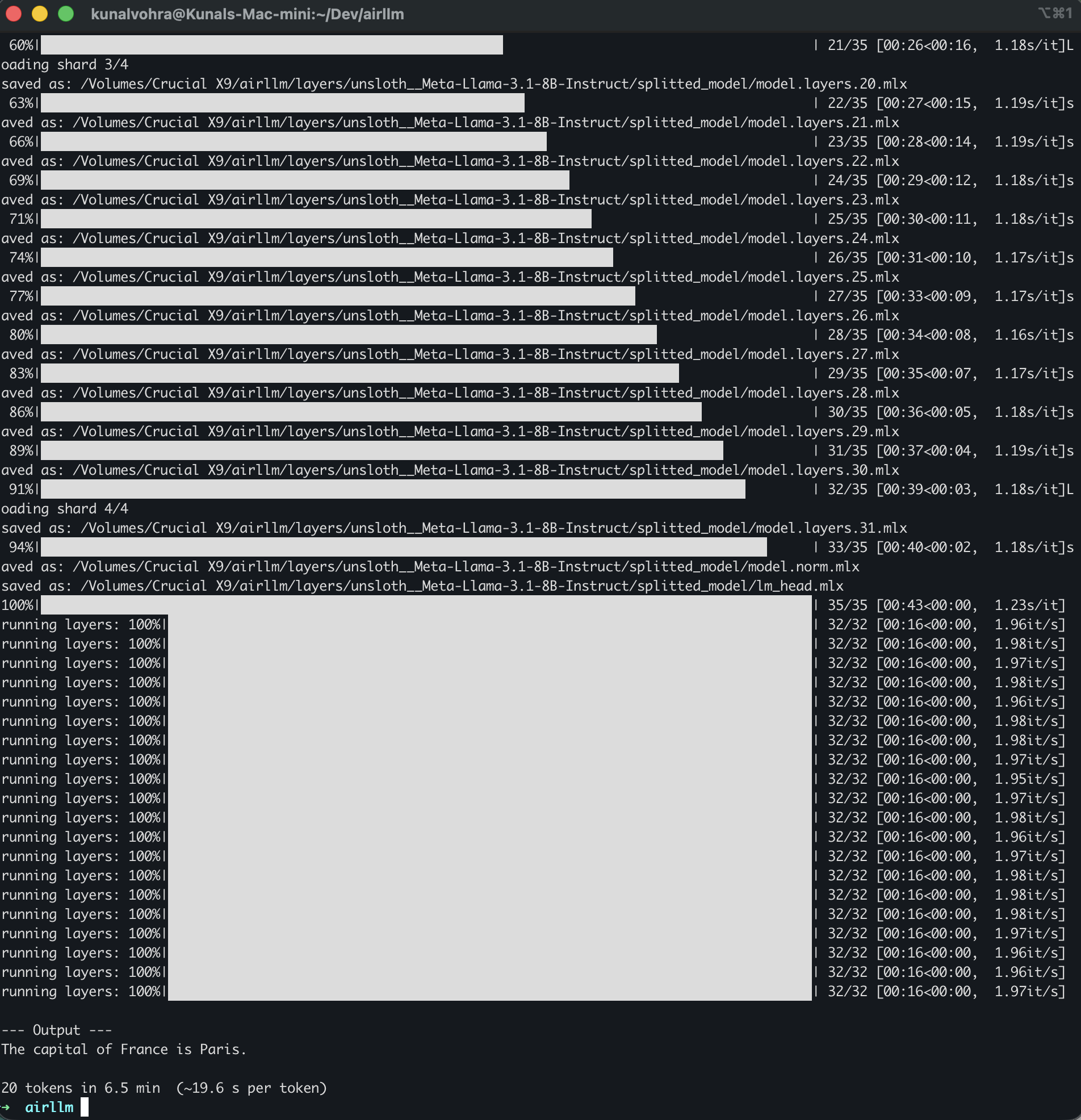
Llama 3.1 8B: 19.6 seconds per token. Twenty tokens took 6.5 minutes. The 32 transformer layers took about 16 seconds per pass, roughly two layers per second. The remaining three and a half seconds went mostly to the two vocabulary layers at the start and end of the model, about 1GB each, which are reloaded for every token. At 15GB per token in 19.6 seconds, the effective read speed was about 0.77GB/s, most of the drive's rated 1GB/s.
Splitting the 8B model into per-layer files was quick by comparison: 35 pieces in 43 seconds, once the 15GB download had finished. Here is the actual run, straight from my terminal:
Llama 3.1 70B, projected: two and a half to three minutes per token. I did not run it; the 8B result makes the math clear. Scaling the 8B numbers to a 141GB model at 0.8 to 1GB/s gives 140 to 180 seconds per token, so a one-sentence answer takes around 30 minutes. That excludes the first run's one-off download, which at the 26MB/s I saw from Hugging Face would take more than an hour on its own, plus the time to split the model.
On a 16GB Mac mini, AirLLM turned Llama 3.1 8B into a 19.6 second per word model. The same model loaded fully into memory answers in real time.
AirLLM vs just running a smaller model properly
Any setup that fits the model in memory beats AirLLM by two to three orders of magnitude, so AirLLM only makes sense for models you cannot fit any other way. My numbers above are measured; the comparisons below are estimates from memory bandwidth and published reviews of similar machines.
The same Mac mini with Ollama. An 8B model at 4-bit uses about 5GB and fits comfortably in 16GB. Reviews of 16GB Macs put models like Qwen 3 8B and Qwen 3.5 9B at roughly 25 to 30 tokens per second. That is about 500 times faster than the 19.6 seconds per token I measured through AirLLM. Most of that gap is AirLLM reading full-precision weights from disk instead of 4-bit weights from memory.
An old many-core server with lots of RAM. A 64-core DDR3 server with 128GB of RAM can hold a 4-bit 70B model (about 40GB) entirely in memory and run it with llama.cpp. Old memory and older CPUs make it slow by modern standards, roughly 0.3 to 1 token per second, but that is still a few hundred times faster than AirLLM streaming the same model off a USB drive.
A Mac with more memory. Apple's current line goes to 32GB on the Mac mini M6, 64GB on the Mac mini M5 Pro, and 128GB on the Mac Studio M5 Max. 64GB is the minimum for a 4-bit 70B model to fit in memory, and it is a tight fit once macOS takes its share; 128GB is comfortable. At that point you would not use AirLLM at all.
If you are a founder weighing local models against an API for your product, this is exactly the kind of decision I help with as a fractional CTO: the answer depends on your latency budget, your data constraints, and what the hardware costs per month next to your API bill, not on what a README says.
When AirLLM is actually worth using
Use AirLLM when you need a model much larger than your memory, can wait minutes per word, and can run the work in batches or overnight; skip it whenever the model already fits. Here is how I would decide.
- Good fit: offline batch jobs, such as classifying or summarizing a few hundred documents overnight with a 70B model on a machine that otherwise could not run one. Also good for evaluating a big model's quality on your own prompts before paying for hardware or API capacity.
- Bad fit: anything interactive. Chat, coding assistants, and agents need tokens per second, not minutes per token.
- Buy disk speed first. Because AirLLM is disk-bound, a Thunderbolt or USB4 NVMe drive at about 3GB/s should roughly triple its speed over the USB drive I used. On a fast internal SSD it would be faster still, if you have the space.
- Budget twice the model size in free disk. For 70B, that is around 300GB.
- Expect to maintain it. The library has not had a release since 2024. On a Mac, plan to patch it as I did, and test output quality, not just whether it runs.
For everyday local use on a 16GB Mac, I would run an 8B to 12B model at 4-bit through Ollama or LM Studio and keep AirLLM for the occasional giant-model experiment. If your team is building AI features and you want a second opinion on model choice, hosting, or cost, a technical advisor engagement or CTO as a service covers exactly this. My notes on AI startup technical due diligence also cover the infrastructure questions investors ask about model hosting.
Frequently asked questions
Can AirLLM really run a 70B model on 4GB of memory? Yes. It loads one layer at a time from disk, so peak memory stays at a few gigabytes. The trade-off is speed: the whole model is read from disk for every token, so a 70B model runs at minutes per token on a typical consumer SSD.
How fast is AirLLM on a Mac? On a base M4 Mac mini with an external USB SSD, I measured 1.0 second per token for TinyLlama 1.1B and 19.6 seconds per token for Llama 3.1 8B. A 70B model projects to two and a half to three minutes per token on the same setup.
Does AirLLM work on Apple Silicon? Yes, through Apple's MLX library, but it needed four fixes in my test, including a patch without which Llama 3.x models produce garbled output. Its compression options do not work on a Mac because they depend on an NVIDIA-only library.
How much disk space does AirLLM need? About twice the model's size, because it keeps the original download and a split copy with one file per layer. A 70B model needs roughly 300GB free.
Is AirLLM better than Ollama? Only for models that do not fit in your memory. For any model that fits, Ollama or llama.cpp is hundreds of times faster, because the weights stay in memory and run at 4-bit precision.
What is the best local model for a 16GB Mac? An 8B to 12B model at 4-bit, such as Qwen 3 8B, Qwen 3.5 9B, or Gemma 4 12B, run through Ollama or LM Studio. Larger models load but leave too little memory for longer conversations.
If you are deciding between running models yourself and paying for an API, book a 30-minute call and walk me through your workload. I will tell you what I would run, where, and what it should cost.
Written By

Kunal Vohra
Technical Co-Founder & Fractional CTO
I've co-founded 6+ startups across India, the UAE, and the US, spanning AI, Web3, fintech, and cybersecurity. I write about the technical and strategic decisions that determine whether a startup thrives or stalls.
Comments
Loading comments…